
The HTML video
final.html is the single-file export, playing right here. Click it, then press ? for the keys, or open it on its own.
Two how-to episodes for one product, built as a series: one kit file holds everything the episodes share, so they look, sound and move the same. Each episode is a 1920x1080 canvas film (no screen recording): the app is drawn procedurally from its own CSS tokens and seed notes, and every frame is a pure function of time.
| Episode | Length | Watch | Poster |
|---|---|---|---|
| 01 · Capture a note in seconds | 92.4 s, 7 steps | episode-01/final.mp4 · episode-01/final.html |
episode-01/poster.jpg |
| 02 · Find anything with search and tags | 90.1 s, 8 steps | episode-02/final.mp4 · episode-02/final.html |
episode-02/poster.jpg |
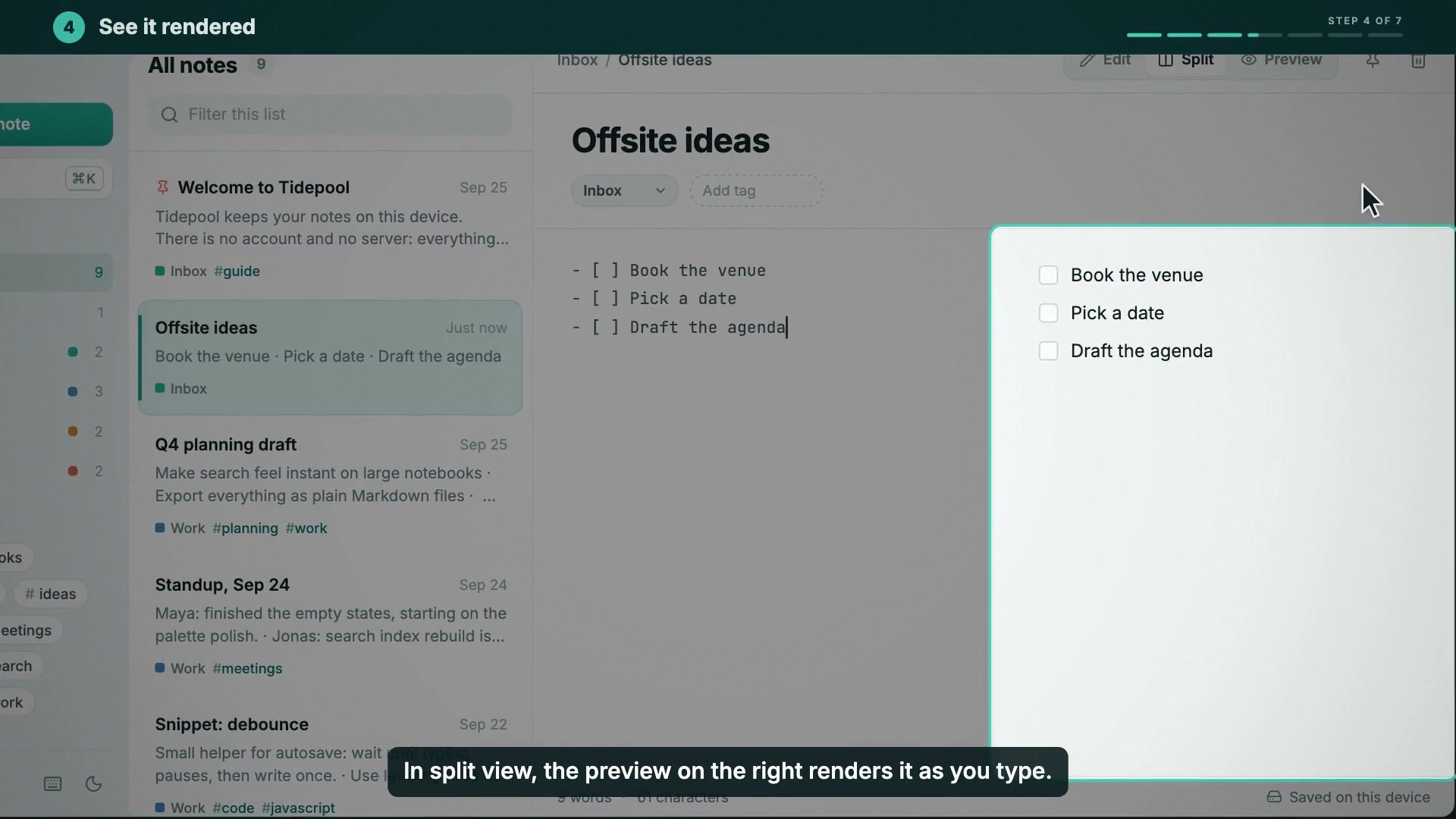
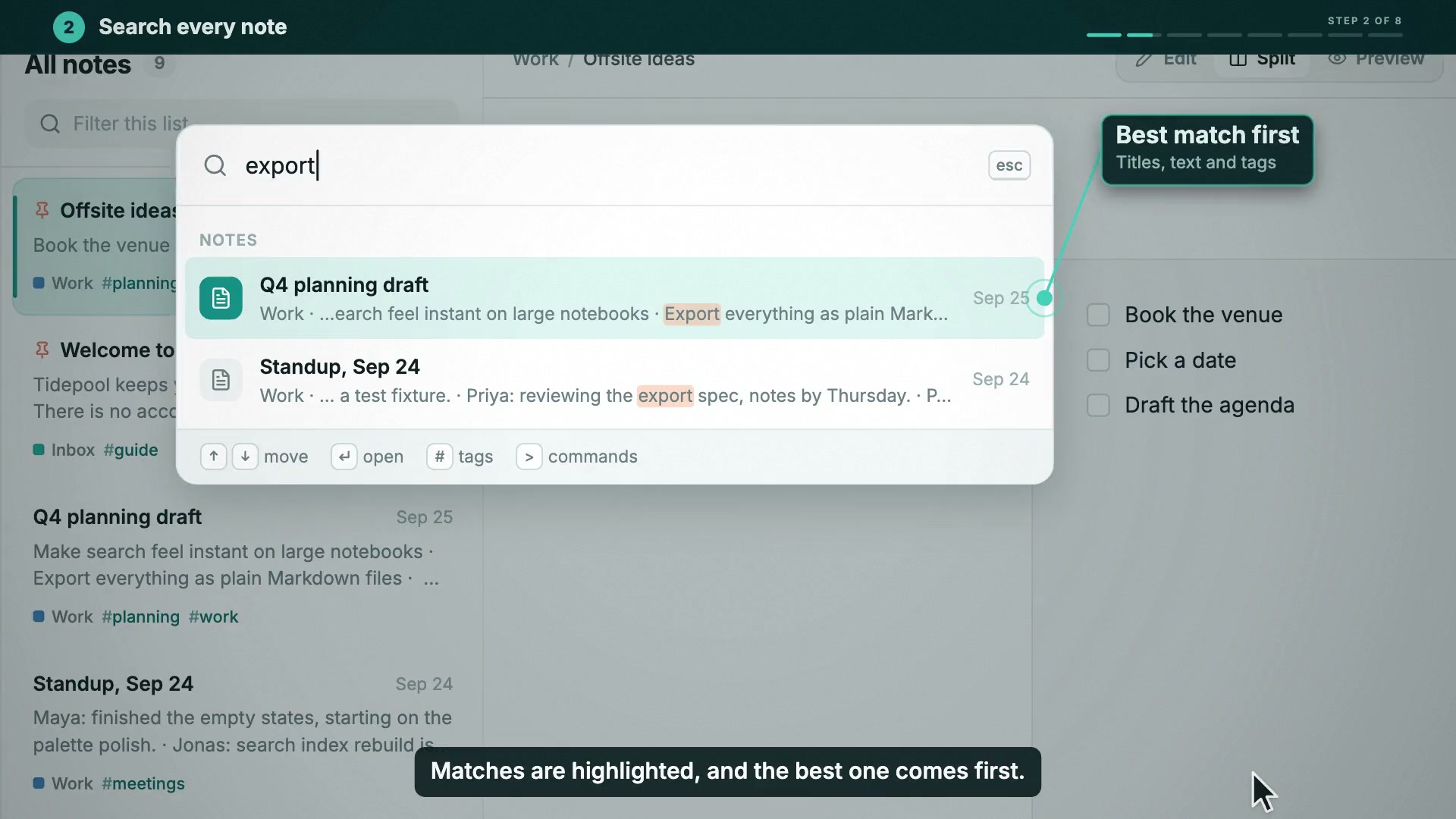
Sizes, loudness and QA results are in each episode's README.
The app: Tidepool is a fictional local-first notes app that exists only as demo material
(examples/_apps/tidepool). It is not a real product and has no ties to any company with a similar
name. Everything the episodes show is something that app really does. That covers the seed notes, the palette's grouping and
ranking, list continuation on Enter, # tags and > commands, the notebook select, pinning, the dark theme
and "Saved on this device". The search results, snippets and highlights come from the same matching
rules the app uses.
The request#
Build a two-episode tutorial series for Tidepool as canvas films with the series kit: 01 "Capture a note in seconds" and 02 "Find anything with search and tags", 90-120 s each, 1920x1080. Shared series chrome, signature motif and a bed that recurs across episodes. UI drawn in the app's real style with hit-rects by name. Cursor, clicks, keycaps, camera zooms, spotlights and callouts; step titles with progress, captions, recap and outro. Kokoro narration drives the timing. Deliver per episode: single-file HTML, MP4, poster, README.
What is shared (the series kit)#
kit.js (the series root) is the only place to edit shared things. showtime series sync . copies
it into every episode, and showtime series check . fails when a copy is stale.
- The product.
KIT.state()is the app's state: its 8 seed notes, filter, mode, palette, theme and focus.KIT.drawApp(T, st)draws the app in a browser window from the app's own tokens: Inter and JetBrains Mono, the teal brand, the light and dark themes, and its Lucide icons as vector paths.KIT.rects(st)gives named hit-rects for that state:newNote,search,nb:work,tag:planning,item:offsite,filter,title,tagInput,nbSelect,menuItem:work,pitem:0,saveState,syncand so on. Cursors, cameras, spotlights and callouts aim at these names, never at coordinates. A note's rect follows it when the list re-sorts. - The behaviour.
KIT.act.*are the app's actions as state events: new note, list continuation, add tag, pick notebook, pin (with the list re-sorting), open or run the palette, set a filter, J/K, toggle preview. Each episode lists them on its timeline andFilm.foldreplays them, so the UI at any time is computed, not keyframed. - The chrome. An intro card with the logo, a step band with
STEP n OF Nand progress segments, captions under the window, keycaps, a recap card of the shortcuts and an outro with the next episode. All of it sits on a deep tide-pool teal backdrop. The step band is opaque, and zoomed shots stay on the app: the camera never shows a sliver of backdrop at an edge, and the app slides under the band only down to its own page, so the browser bar never peeks out. The recap card is gone before the outro's words rise, so the two never overprint. - The tour pattern. When a callout names a region of the window, a spotlight lights that region and
dims the rest, one region at a time. Callout cards sit in empty space or on dimmed parts of the picture,
never on text the viewer is reading (
showtime checkreports a card that hides text). - The sound. A four-bell signature motif opens every episode and its falling answer closes it. Under the talking there is the same bed in every episode: I-V-vi-IVmaj7 at 80 bpm in F, a marimba pulse and a high "drop" every fourth bar. The kit also carries the click, key, Enter, snap, whoosh and step sounds. The bed ducks by 11 dB while the voice speaks: the speech spans come from the narration timeline, so the score knows where the voice is.
Voice first: narration → timeline → scene timings#
Each episode's narration.md has one line per beat, with pause_after to leave room for an action.
showtime voice script (Kokoro, af_heart, tutorial style) returns real line and word times.
vo-cues.mjs turns voice/timeline.json into vo.js. episode.js then builds every cue from words:
keyN:     at('new', 'N.'),            // "press N": the N keycap, the key sound and the new note
clickTag: at('tag', 'Click'),         // the pointer clicks Add tag on "Click"
cmdE1:    at('flip', 'E'),            // "Command E" flips to the full preview
The captions are the spoken words, chunked by sentence at 58 characters or fewer and timed to the words. Changing a sentence and re-running the two commands moves everything that depends on it.
Why the narration is embedded (and not mixed under the live score)#
The HTML export can play a Synth score live, which makes the smallest file, but a live score cannot
include a recorded voice: the player streams either the procedural score or one embedded soundtrack.
These episodes are narrated, so the soundtrack is embedded (--audio embed). That is the same
master the MP4 carries, with the voice, the ducked bed and the UI sounds at -14 LUFS. It is AAC at
--bitrate 64k (about 8 KB/s): 1.29 MB and 1.27 MB per episode, of which about 265 KB is picture (scripts
104 KB, fonts 118 KB, player 44 KB, all gzip-packed). The HTML and the MP4 therefore sound the same,
including the ducking. For comparison, episode 01 exported with --audio score (no voice) is 262 KB.
Layout#
series.json        name, kit, episodes
kit.js             the series kit (edit here, then `series sync`)
showtime.json, index.html, cues.js, opener.js     the series opener (a project of its own)
vo-cues.mjs        voice/timeline.json -> vo.js for every episode
ICONS-LICENSE.txt  Lucide (ISC) for the icon paths in kit.js
episode-NN/
  showtime.json    size, fps, duration and poster time
  index.html       the page that loads kit.js, vo.js and episode.js
  narration.md     the script (one line per beat)
  voice/           timeline.json, vo.words.json, vo.srt (the .wav files are regenerated, not shipped)
  vo.js            generated from voice/timeline.json
  episode.js       the timeline table: steps, state events, typing, keys, cursor, camera, spots, callouts
  audio/mix.json   the voice track (the score is the kit's; the render mixes both)
  kit.js           synced copy of ../kit.js (never edit)
  final.mp4, final.html, poster.jpg, captions.srt, README.md
Commands#
All commands go through skills/showtime/bin/showtime (paths shortened; run from this folder).
showtime new series 11-tutorial-series-tidepool            # the scaffold (then kit.js rewritten for Tidepool)
showtime voice ipa "Tidepool"                              # espeak says it right: tˈaɪdpuːl
showtime voice script episode-01/narration.md -o episode-01/voice
showtime voice script episode-02/narration.md -o episode-02/voice
node vo-cues.mjs                                           # timeline.json -> vo.js (every episode)
showtime series sync .                                     # kit.js -> every episode
showtime series check .
showtime check episode-01                                  # and episode-02
showtime snap episode-01 --at 9,20.6,40.5,55.8,76 --format jpg
showtime score episode-01                                  # score levels in seconds, no frames
showtime render episode-01 -o ep01.mp4                     # master (CRF 16)
showtime qa ep01.mp4 --project episode-01 --platform youtube
showtime deliver exports ep01.mp4 --targets original --max-mb 20   # exports/ep01.20mb.mp4 -> episode-01/final.mp4
showtime deliver poster ep01.mp4 --at 40.5 --out episode-01/poster.jpg
showtime export html episode-01 -o episode-01/final.html --audio embed --bitrate 64k
To add episode 03: showtime series add . --title "...", write its narration.md, run the voice
script and node vo-cues.mjs, then fill episode-03/episode.js (the two episodes here are the
pattern) and list it in series.json. showtime series export . -o site/ writes every episode
and the opener as HTML plus an index page. That export embeds the audio at its default 96k bitrate.
Known gaps#
- Masters are large (97 MB and 102 MB at CRF 16). The slow push-ins that keep holds from freezing move every pixel. The shipped files are the 20 MB caps.
- The live score cannot carry a voice. A narrated episode costs about 1 MB of embedded audio (see above).
- A few contrast warnings in
showtime check(12 in episode 01, 6 in episode 02) are the app's own design, drawn as it really looks: white on the teal New note button (4.0:1), the teal counts on the active sidebar row, and the#in tag chips. The app's secondary text (its muted and faint tokens) is marked as UI detail in the kit, so its contrast is a note. Text under a spotlight or the palette's backdrop is not judged: it is dimmed on purpose. short_textwarnings in episode 02 (19): J and K step through three notes, so each note's body is on screen for about 1.3 s, and typing "week" in the filter redraws the highlighted fragments with every letter. Both are the app moving, not text the viewer is asked to read.- The voice
.wavfiles are not shipped. Rebuild them withshowtime voice scriptbefore a render or an embedded export (Kokoro caches each line, so a rebuild with an unchanged script is quick). - Only macOS x86_64 was used here. Nothing in the kit or the scripts depends on the OS: fonts are files, and symbols are drawn as vectors.