Your First Project
This walkthrough takes you from zero to a shipped, compounded first phase. It uses a fictional "task manager API" as the example, but the steps are identical for any project.
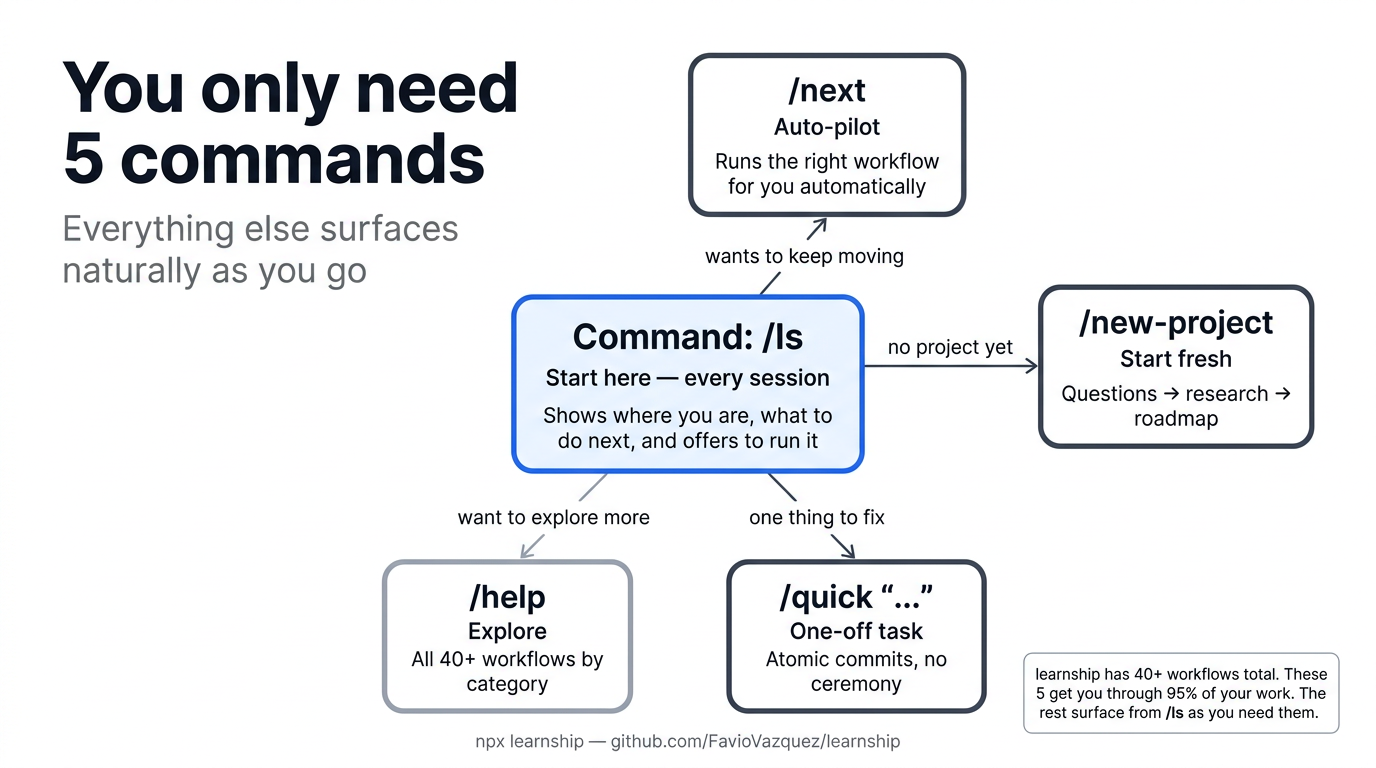
Step 1: Start your AI agent and run /ls
Since no project exists yet, learnship displays a welcome message and offers to run /new-project. Accept it, or run it directly:
Step 2: Answer the questions
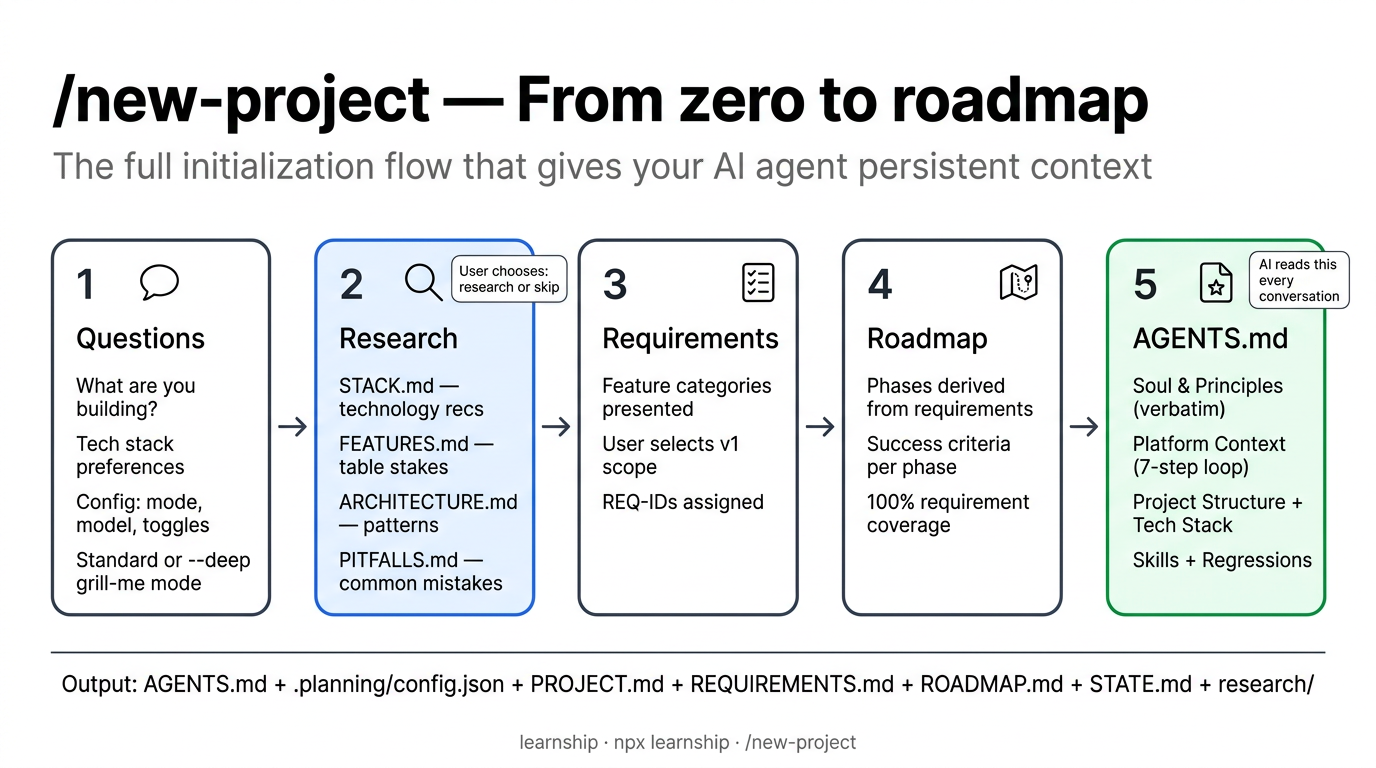
/new-project runs a structured interview to understand what you're building. Be honest and direct — the more context you give, the better the agent's plans will be.
Project questions
What are you building?
→ A REST API for a task manager with authentication and real-time updates

What problem does it solve?
→ Teams need a central task registry synced across devices in real time

What's your primary tech stack (or "help me decide")?
→ Node.js, PostgreSQL, WebSocket

What platforms or environments will this run on?
→ Docker containers, deployed to AWS ECS
Configuration questions
After the project questions, /new-project asks how you want to configure the project. The first question is a fast path:
How do you want to configure this project?
→ Quick — use recommended defaults  (1 question, ~5 seconds)
→ Customize — walk through every setting  (~15 questions, 4 rounds)
Quick writes a sensible default config and moves on. It uses: mode: auto, granularity: coarse, model_profile: balanced, all workflow agents on (research, plan-check, verifier, review, solutions-search), ship pipeline + conventional commits + PR template on, planning docs auto-committed, parallelization on (Claude Code, OpenCode, Codex) or off (Windsurf, Cursor, Gemini). Best for most projects — you can change any setting later with /settings.
Customize is the long form. It walks four rounds of questions covering working style, granularity, model profile, learning partner, questioning depth, output verbosity, workflow agents, TDD, ship pipeline, git tracking, commit mode, and (on Claude Code, OpenCode, Codex) parallel subagents — on by default, you can turn them off. Use this when your project has unusual conventions or you want fine-grained control upfront.
All answers — quick or custom — are written to .planning/config.json, which every workflow reads. You can change any setting later with /settings.
All 22 config keys
/new-project covers the most common settings interactively. The full schema has 22 keys including planning.commit_mode, workflow.solutions_search, review.auto_after_verify, and git.branching_strategy. See Configuration for the complete reference.
Step 3: Research decision
The agent asks: "Before I write the requirements — do you want me to research the domain ecosystem first?"
- Research first (recommended) — the agent investigates standard stacks, expected features, architecture patterns, and common pitfalls for your domain
- Skip research — go straight to requirements
This is always your choice
The agent will never skip this question or decide on your behalf, no matter how familiar the domain seems.
If you choose research, the agent produces 4 research documents plus a summary:
.planning/research/
├── STACK.md           # technology recommendations
├── FEATURES.md        # table stakes vs differentiators
├── ARCHITECTURE.md    # structural patterns
├── PITFALLS.md        # common mistakes
└── SUMMARY.md         # executive summary
Step 4: Requirements and roadmap
The agent presents feature categories and asks you to select which are v1. You approve the requirements, then a phase-by-phase roadmap:
Milestone: v1.0: Task Manager API

Phase 1: Project foundation (auth, DB schema, migrations)
Phase 2: Core task endpoints (CRUD, filtering, pagination)
Phase 3: Real-time layer (WebSocket, event broadcasting)
Phase 4: Testing and hardening (integration tests, error handling)
Review and approve. If anything looks off, tell the agent to adjust before approving.
Step 5: AGENTS.md generation
After the roadmap is approved, /new-project generates AGENTS.md at your project root. This is the most important file in your project — your AI platform reads it automatically at the start of every conversation.
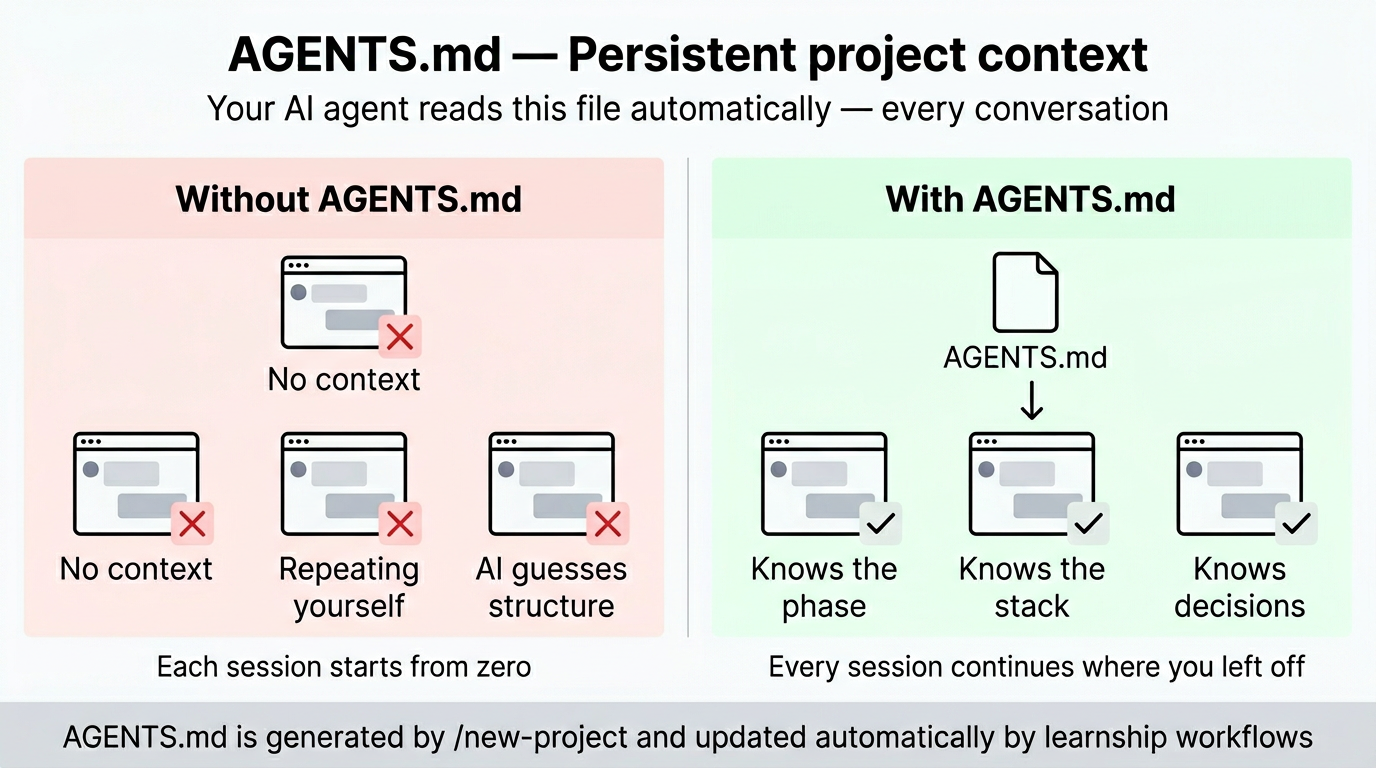
AGENTS.md
├── Soul & Principles        # Pair-programmer framing, 10 working principles
├── Platform Context         # Points to .planning/, explains the 7-step phase loop
├── Current Phase            # Updated automatically by workflows as phases advance
├── Project Structure        # Directory tree with descriptions
├── Tech Stack               # Language, framework, libraries, how to run dev/tests
├── Skills                   # CHANGELOG discipline, decision register patterns
└── Regressions              # Updated by /debug when bugs are fixed
The Soul and Principles sections define the working relationship between you and the agent: direct communication, dissenting opinions welcome, learning-first culture. The Platform Context section tells the agent about the phase loop and where to find planning artifacts. These sections are copied verbatim from the learnship template — they're the same for every project. The variable sections (Project Structure, Tech Stack, Current Phase) are filled from your answers and research.
Learning moment
After /new-project completes, try @agentic-learning brainstorm [your project topic] to talk through the architecture before any code is written. Blind spots surfaced here don't become bugs later.
What /new-project produced
.planning/
├── config.json               ← 22 workflow settings
├── PROJECT.md                ← what you're building, for whom, and why
├── REQUIREMENTS.md           ← REQ-001 … REQ-N with acceptance criteria
├── ROADMAP.md                ← phases with status tracking
├── STATE.md                  ← current position (Phase 1, planning)
└── research/                 ← domain research (if you chose research)
    ├── STACK.md
    ├── FEATURES.md
    ├── ARCHITECTURE.md
    ├── PITFALLS.md
    └── SUMMARY.md
AGENTS.md                     ← AI reads this every conversation
Everything is committed to git (unless you set planning.commit_mode: "manual").
Now the phase loop begins. Every phase follows the same 7 steps:
Step 6: Discuss Phase 1
/discuss-phase 1
/discuss-phase 1 --deep   # extended questioning: walks every branch until shared understanding
This is a conversation, not a form. The agent reads AGENTS.md and your roadmap, then asks targeted questions about implementation preferences for this phase:
- What libraries do you prefer for the auth layer?
- Should database migrations be code-first or SQL-first?
- Any existing patterns to follow for error handling?
Your answers get written to .planning/phases/01-*/01-CONTEXT.md — a persistent file the planner reads before creating any plans.
Step 7: Plan Phase 1
The planner:
- Reads your
CONTEXT.mdand all prior decisions - Searches
.planning/solutions/for relevant prior art (if any exists from previous phases) - Researches the specific technical domain for this phase
- Creates 2–4 executable
PLAN.mdfiles as vertical slices — each plan is a tracer bullet delivering one demoable user-facing behavior end-to-end (data → logic → API → UI → test) - Runs a verification loop (up to 3 passes) to check plans are coherent and not horizontally layered
Each plan describes concrete tasks with enough detail that an executor agent can implement them without guessing. Single-layer phases (migrations, style passes) set single_layer_justified: true in the plan frontmatter.
Before you execute
@agentic-learning explain-first [phase topic]: explain the planned approach back in your own words before touching code. Gaps in the explanation are gaps in the plan.
Step 8: Execute Phase 1
Plans run in wave order: independent plans in the same wave execute before dependent ones. Each task produces an atomic git commit.
On Claude Code, OpenCode, and Codex CLI, plans in the same wave run in parallel by default — each gets its own executor with a fresh 200k context budget. To run sequentially, set:
Watch the output — the executor narrates what it's doing and surfaces questions if anything is ambiguous.
Step 9: Verify Phase 1
This is you doing manual user acceptance testing, with the agent as your diagnostic partner:
- The agent shows you what was built and the acceptance criteria
- You test it: run the app, try the endpoints, check the behavior
- Report any issues:
"The /login endpoint returns 500 when email is missing" - The agent diagnoses root causes and creates targeted fix plans
- Execute the fixes, then re-verify
When everything passes:
If review.auto_after_verify is true in your config, the agent automatically proceeds to the review step. Otherwise it suggests it in the done banner.
Optional live smoke test: If @playwright/mcp is configured on your platform, /verify-work can walk the golden path for UI deliverables automatically — navigating to the app, walking through each test, and checking the browser console for JS errors. Supported on any MCP-enabled platform (all 6 platforms). See Playwright MCP setup.
Step 10: Review Phase 1
/review              # two-pass review (default)
/review --quality-only   # skip spec compliance, quality review only
/review now runs two passes:
Pass 1 — Spec Compliance: Checks whether the diff actually delivers what was planned. Reads PLAN.md must_haves and classifies each deliverable as COVERED, PARTIAL, or MISSING. If any are missing, you decide: stop and fix them, or continue to the quality pass with gaps flagged as P1 findings. This catches "we built the wrong thing" before you spend time reviewing how well it was built.
Pass 2 — Quality: Multi-persona code review through 6 lenses: correctness, testing, security, performance, maintainability, and adversarial. Only lenses relevant to the diff are activated.
The output is severity-ranked findings (P0–P3) with confidence scores. Address any P0 or P1 findings before shipping. Spec compliance result appears in the report header.
Step 11: Ship Phase 1
End-to-end delivery pipeline:
- Detects your test runner and runs tests
- Runs linter if present
- Stages changes
- Creates a conventional commit (
feat:,fix:, etc.) - Pushes to current branch
- Creates a pull request with auto-generated description
/ship                  # full pipeline
/ship --skip-tests     # skip test step
/ship --dry-run        # preview without executing
Step 12: Compound Phase 1
Capture what you learned while context is fresh. The agent asks what you want to compound — a bug you fixed, a pattern you discovered, an architectural insight — and writes a structured document to .planning/solutions/.
Future /plan-phase runs search this directory for prior art before doing domain research. Solved problems don't get re-solved.
This is where knowledge accumulates
Each /compound entry has YAML frontmatter with category, tags, and severity. Over time, your .planning/solutions/ directory becomes a searchable project knowledge base that makes every future phase faster.
What you have after Phase 1
.planning/
├── config.json                 ← 22 workflow settings
├── PROJECT.md                  ← what you're building
├── REQUIREMENTS.md             ← REQ-001 … REQ-N
├── ROADMAP.md                  ← Phase 1 ✓, Phases 2-4 pending
├── STATE.md                    ← current position (Phase 2, planning)
├── research/                   ← domain research
├── solutions/                  ← compounded knowledge from Phase 1
│   └── auth/
│       └── jwt-error-handling.md
└── phases/
    └── 01-foundation/
        ├── 01-CONTEXT.md       ← your implementation preferences
        ├── 01-RESEARCH.md      ← phase-specific research
        ├── 01-01-PLAN.md       ← executed plan
        ├── 01-01-SUMMARY.md    ← execution outcomes
        └── 01-UAT.md           ← verification results
AGENTS.md                       ← updated: Phase 2 is now current
Repeat for each phase
Every phase follows the same 7-step loop:
/discuss-phase 2                # align on implementation decisions
/plan-phase 2                   # research + create executable plans
/execute-phase 2                # build with atomic commits
/verify-work 2                  # manual UAT + diagnosis
/review                         # multi-persona code review
/ship                           # test → lint → commit → push → PR
/compound                       # capture what you learned
/ls at any time shows your current position and what to do next. /next reads state and immediately runs the correct next step.
When all phases are done
/sync-docs                      # detect stale documentation after code changes
/audit-milestone                # check requirement coverage before releasing
/complete-milestone             # archive phases, tag release, advance project
/milestone-retrospective        # 5-question retrospective + schedule spaced review
/sync-docs compares documentation against recent git changes and catches dead references, outdated descriptions, and missing coverage. It can auto-fix simple cases (renamed files, updated paths) with --autofix.
/audit-milestone maps every REQ-ID to implementation and catches stubs, placeholders, and integration gaps. Don't skip this.
After /complete-milestone, your project is ready for the next milestone:
/ideate                         # codebase-grounded idea generation — what's worth building next?
/discuss-milestone v2.0         # capture goals and anti-goals
/challenge                      # stress-test the scope — is this worth building?
/new-milestone v2.0             # create the next roadmap
/ideate scans your codebase for TODOs, test gaps, hotspots, and friction points, then generates ranked improvement ideas across four thinking frames (user pain, inversion, assumption-breaking, leverage). Use it when you're not sure what to build next.
/challenge is a product + engineering stress-test. It asks forcing questions through two lenses — "Is this worth building?" (product) and "Will it hold?" (engineering) — then delivers a verdict: proceed, rethink, or reduce scope. Use it before committing to ambitious milestones.
Key takeaways
/lsis your home base. Start every session there. It tells you where you are and what to do next.- Don't skip
/discuss-phase. The context file is the planner's primary input. 10 minutes of discussion prevents hours of rework. /verify-workis you testing, not the agent. The agent is your diagnostic partner, not a substitute for real testing./review→/ship→/compoundclose the loop. Code review catches what testing misses. Shipping ensures clean delivery. Compounding turns solved problems into searchable knowledge.- Bugs are learning opportunities. Use
@agentic-learning learn [domain]after fixing a bug to extract the pattern.
See Examples → Greenfield Project for a full end-to-end walkthrough with realistic output.