Configuration
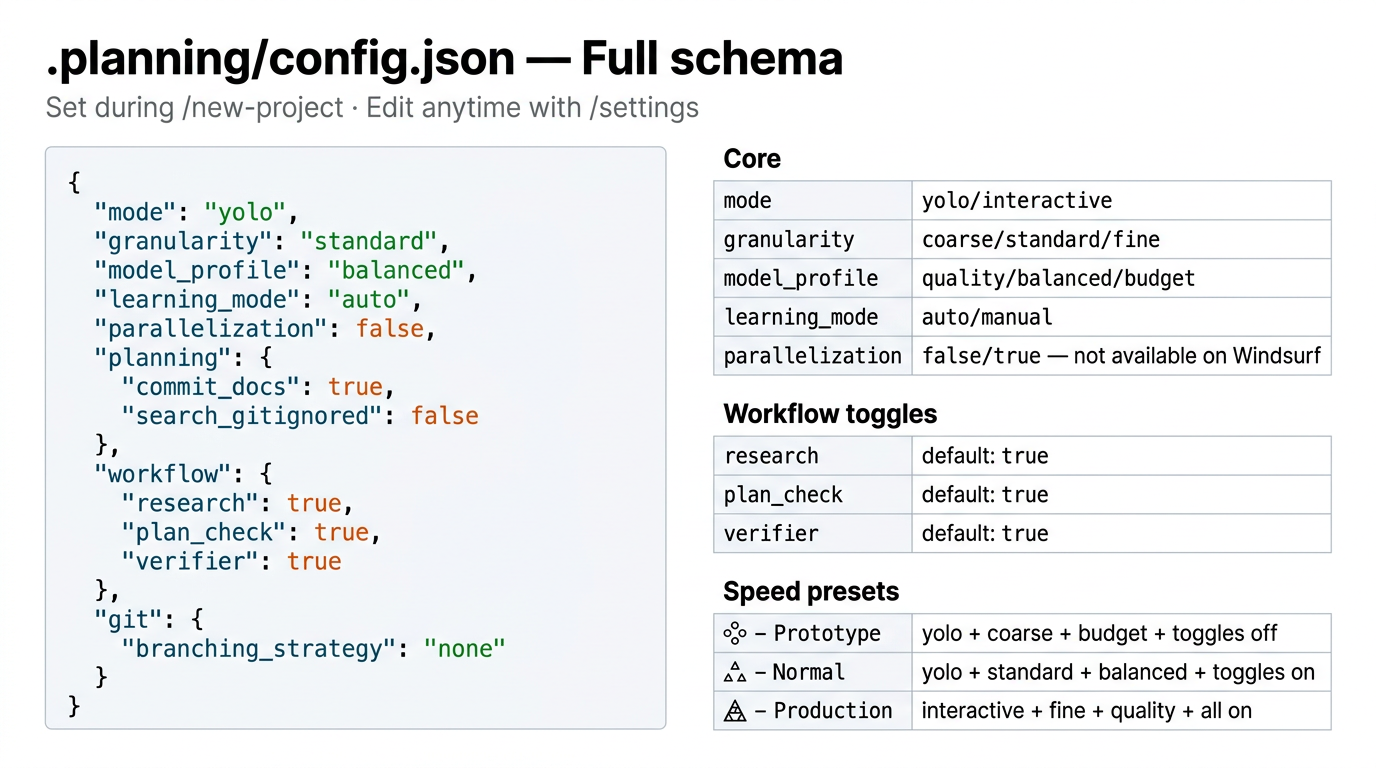
Project settings live in .planning/config.json. Set during /new-project or edit interactively with /settings.
Full schema
{
  "mode": "interactive",
  "granularity": "standard",
  "model_profile": "balanced",
  "learning_mode": "auto",
  "context": "dev",
  "test_first": false,
  "planning": {
    "commit_docs": true,
    "commit_mode": "auto",
    "search_gitignored": false
  },
  "workflow": {
    "research": true,
    "plan_check": true,
    "verifier": true,
    "validation": true,
    "review": true,
    "solutions_search": true,
    "security_enforcement": true,
    "discuss_mode": "discuss",
    "tdd_mode": false
  },
  "parallelization": {
    "enabled": false,
    "plan_level": true,
    "task_level": false,
    "max_concurrent_agents": 5,
    "min_plans_for_parallel": 2
  },
  "gates": {
    "confirm_project": true,
    "confirm_phases": true,
    "confirm_roadmap": true,
    "confirm_plan": true,
    "execute_next_plan": true,
    "issues_review": true,
    "confirm_transition": true
  },
  "safety": {
    "always_confirm_destructive": true,
    "always_confirm_external_services": true
  },
  "review": {
    "auto_after_verify": false
  },
  "ship": {
    "auto_test": true,
    "conventional_commits": true,
    "pr_template": true
  },
  "hooks": {
    "context_warnings": true
  },
  "git": {
    "branching_strategy": "none",
    "phase_branch_template": "phase-{phase}-{slug}",
    "milestone_branch_template": "{milestone}-{slug}"
  }
}
Core settings
mode
Controls how much the agent auto-approves vs. asks for confirmation.
| Value | Behavior |
|---|---|
"auto" | Agent auto-approves intermediate steps. Faster. Default. |
"interactive" | Agent pauses at each decision point and waits for your explicit approval. Safer for production work. |
granularity
Controls the size of phases in the roadmap.
| Value | Phases per milestone | Best for |
|---|---|---|
"coarse" | 3–5 | Prototyping, familiar domains |
"standard" | 5–8 | Normal development. Default. |
"fine" | 8–12 | Production-grade, complex systems |
model_profile
Sets the tier of AI model used per agent role.
| Profile | Planner | Executor | Researcher | Verifier |
|---|---|---|---|---|
"quality" | large | large | large | medium |
"balanced" | large | medium | medium | medium |
"budget" | medium | medium | small | small |
large= Claude Opus 4.6 / Gemini 3.1 Pro / GPT-5.4
medium= Claude Sonnet 4.6 / Gemini 3.1 Flash / GPT-5.4-mini
small= Claude Haiku 4.5 / Gemini 3.1 Flash-Lite / GPT-5.4-nano
Windsurf, Cursor, and OpenCode use the platform default — tiers signal intended task complexity.
Switch quickly: /set-profile quality · /set-profile balanced · /set-profile budget
learning_mode
| Value | Behavior |
|---|---|
"auto" | Learning checkpoints offered automatically at phase transitions. Default. |
"manual" | Checkpoints are quiet: invoke @agentic-learning explicitly when you want it. |
parallelization
| Value | Behavior |
|---|---|
false | Sequential execution. Always safe. Default. |
true | Parallel subagents on Claude Code, OpenCode, Gemini CLI, Codex CLI. Each plan gets its own 200k context. |
context (v2.2)
Controls the agent's output style by loading a context profile from learnship/contexts/.
| Value | Verbosity | Output style | Best for |
|---|---|---|---|
"dev" | Low | Concise, action-oriented. Lead with code, skip preamble. | Day-to-day development. Default. |
"research" | High | Verbose, exploratory. Multiple approaches with pros/cons. | Domain research, architecture decisions. |
"review" | Medium | Critical, detail-focused. Findings by severity with file:line references. | Code review, audits, pre-ship checks. |
Switch with /settings or edit config.json directly. Takes effect on the next workflow run.
test_first (v2.0)
| Value | Behavior |
|---|---|
false | Normal execution. Default. |
true | TDD mode: executors write failing test first, verify red, write minimum code, verify green, then refactor. |
Planning settings
planning.commit_docs
| Value | Behavior |
|---|---|
true | Planning artifacts (.planning/) are committed to git. Default. |
false | Artifacts stay local. Add .planning/ to .gitignore. |
planning.commit_mode
| Value | Behavior |
|---|---|
"auto" | Commit after each workflow step (config, requirements, roadmap, AGENTS.md). Default. |
"manual" | No automatic commits. Stage and commit when you choose. |
planning.search_gitignored
| Value | Behavior |
|---|---|
false | Agent respects .gitignore during codebase searches. Default. |
true | Agent searches all files including gitignored ones. |
Workflow toggles
| Toggle | Default | What it controls |
|---|---|---|
workflow.research | true | Domain research before planning each phase. Turn off for familiar domains to save tokens. |
workflow.plan_check | true | Verification loop (up to 3 passes) after plans are created. Includes vertical slice integrity check. Turn off for quick iterations. |
workflow.verifier | true | Post-execution verification against phase goals. |
workflow.validation | true | Test coverage mapping during plan-phase. Ensures testable acceptance criteria. |
workflow.review | true | Enable /review suggestions after /verify-work. (v2.0) |
workflow.solutions_search | true | Search .planning/solutions/ for prior art during /plan-phase. (v2.0) |
workflow.discuss_mode | "discuss" | Questioning depth for /discuss-phase and /new-project. See below. (v2.3.4) |
workflow.tdd_mode | false | Instruct planner to apply TDD task ordering to eligible tasks. |
workflow.discuss_mode (v2.3.4)
Controls the depth of questioning in /discuss-phase and /new-project Step 3.
| Value | Behavior |
|---|---|
"discuss" | Standard mode: 4 focused exchanges per area, then move on. Default. |
"deep" | Extended deep questioning: walks every decision branch until shared understanding is reached. Provides a recommended answer with each question. Produces a richer CONTEXT.md. |
Equivalent to passing --deep flag: discuss-phase N --deep or new-project --deep.
When to use "deep": Complex phases with many implementation choices, new domains, or when past phases revealed too many ambiguous decisions.
Review settings (v2.0)
| Key | Default | What it controls |
|---|---|---|
review.auto_after_verify | false | When true, /review runs automatically after /verify-work passes. |
Ship settings (v2.0)
| Key | Default | What it controls |
|---|---|---|
ship.auto_test | true | Run test suite before shipping. |
ship.conventional_commits | true | Use conventional commit format (feat:, fix:, chore:, etc.). |
ship.pr_template | true | Auto-generate PR description from commit history and SUMMARY.md files. |
Git branching
| Strategy | Creates branch | Best for |
|---|---|---|
"none" | Never | Solo dev, simple projects. Default. |
"phase" | At each execute-phase | Code review per phase |
"milestone" | At first execute-phase | Release branches, PR per version |
Template variables: {phase} = phase number, {slug} = kebab-case phase name, {milestone} = milestone version.
Speed vs. quality presets
| Scenario | mode | granularity | model_profile | Toggles |
|---|---|---|---|---|
| Prototype / spike | auto | coarse | budget | research: off, plan_check: off |
| Normal development | auto | standard | balanced | all on |
| Production / client | interactive | fine | quality | all on |
Apply a preset with /settings or edit config.json directly. The /set-profile command switches model_profile only: for full preset changes use /settings.
Editing settings
Interactive editor:
One-step model switch:
Direct edit: Open .planning/config.json in your editor: changes take effect immediately on the next workflow run.
Session hooks (v2.2)
On Claude Code and Gemini CLI, learnship installs 4 session hooks via settings.json:
| Hook | Type | What it does |
|---|---|---|
learnship-statusline.js | Notification | Status bar showing model, task/phase, directory, and context usage bar (green → yellow → orange → red) |
learnship-context-monitor.js | PostToolUse | Warns the AI at 35% remaining (WARNING) and 25% remaining (CRITICAL) context. Prevents new work when context is nearly exhausted. |
learnship-prompt-guard.js | PreToolUse | Scans .planning/ file writes for prompt injection patterns. Advisory only — does not block. |
learnship-session-state.js | SessionStart | Injects STATE.md orientation and triggers background update checks. |
Hooks are installed automatically during npx learnship --claude or --gemini. Other platforms (Windsurf, OpenCode, Codex, Cursor) do not support hooks and are unaffected.
Interactive questions (v2.2)
14 workflows now use structured interactive questions for user-facing decisions. Instead of plain numbered text lists, the agent presents choices using your platform's native question tool:
| Platform | Tool name |
|---|---|
| Claude Code | AskUserQuestion |
| Windsurf | ask_user_question |
| OpenCode | question |
| Gemini CLI | ask_user |
| Codex CLI | request_user_input |
| Cursor | Text fallback (no native tool) |
install.js automatically rewrites the tool name for each platform — you don't need to configure anything.
Upgrade safety (v2.2)
After every install, learnship generates learnship-file-manifest.json with SHA-256 hashes of all installed files. On the next upgrade:
- The installer compares current files against the manifest
- Files you modified locally are detected automatically
- Modified files are backed up to
learnship-local-patches/before overwriting - After upgrade, run
/reapply-patchesto restore your customizations